Contacts holds everyone your organization has met through Freshmint, in one list your whole team shares. Open it from the sidebar.
How people get into Contacts
- From your events. When an event completes, everyone on its attendee list is added to Contacts for every organization confirmed on the event: the primary host, co-hosts and sponsors. Each contact keeps the event and their status in their history.
- Added by hand. Select Add Contact and enter a first name, last name and email. Phone is optional.
- Imported. See below.
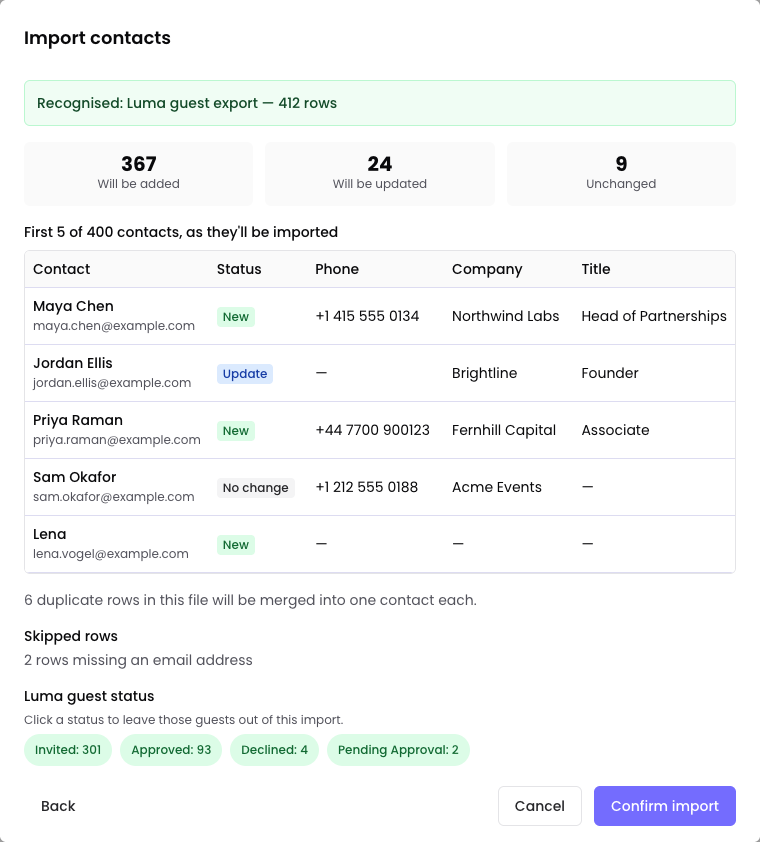
People already in your Contacts are not duplicated. When an event adds someone you already have, it only fills in fields that are blank. An import shows you which contacts it will add and which it will update before you confirm.
Import contacts
- Select Import.
- Choose where the file comes from:
- Luma: export your guest list from Luma (Manage, then Guests), then drop the file in. You can leave out guests by their Luma status, for example people who were only invited.
- Other CSV: any spreadsheet saved as CSV. Match its columns to Freshmint's fields. A Download CSV Template is available.
- Check the preview. It shows which contacts will be added, which will be updated, and any rows that will be skipped and why.
- Select Confirm import.
Files can be up to 4MB. For a larger list, split it into several files.
Undo Latest Import reverses your most recent import, within 24 hours.
Tags
Use tags to group contacts, for example "VIP" or "Customer". Select contacts and choose Add tags or Remove tags, or create a new tag with its own colors. You can include tags in an import, separated by a semicolon.
Find people
Search by name, email or tag. Filter by tag, and by date range: last 7, 30 or 90 days, last year, or a custom range.
A contact's profile
Open a contact to see their details, their tags, and every event of yours they registered for, with their status at each. You can edit their details, except their email, and names and phone numbers that come from the person's own Freshmint profile.
Export
Organization admins can select Export all to download every contact in the organization as a CSV. Filters are not applied to the export.
Use contacts for an event
On an event's Attendees tab, select Add, then Add from Contacts. See Add attendees.
Limits
The Free plan includes up to 5,000 contacts. Pro has no limit. See Plans: Free and Pro.
Still need help?
Email support@freshmint.ai or use the form in the help center. A person on the Freshmint team reads every message.
Contact support